Changes...
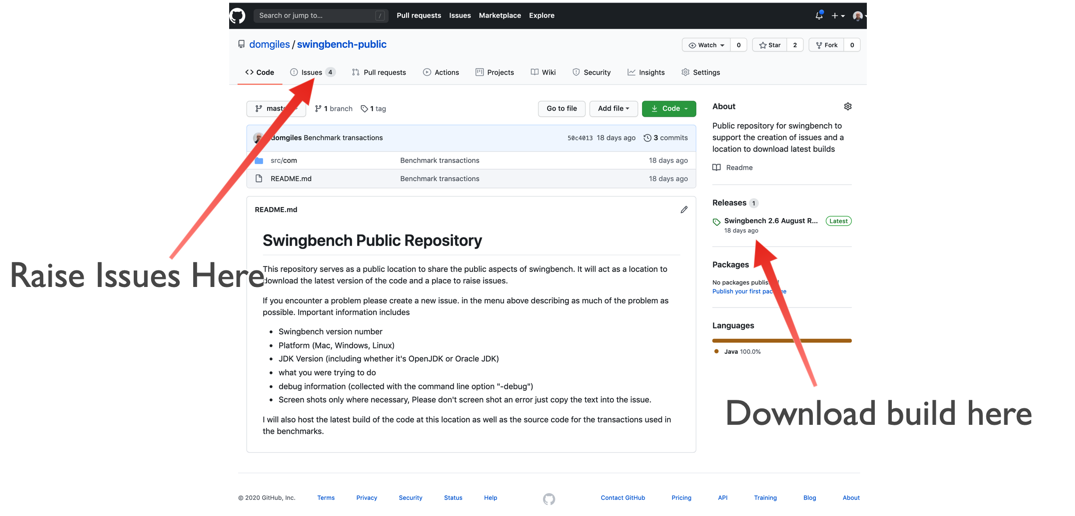
To make it easier to maintain the code I'm moving the download of code and issue creation to GitHub. I'm hoping this will make it easier to track problems as they arise and quicker to fix.
So from now on can you please head over to the public swingbench Github repository (https://github.com/domgiles/swingbench-public). You'll be able to download the newest version of the code from there (https://github.com/domgiles/swingbench-public/releases/download/production/swingbenchlatest.zip) and raise new issues as shown in the picture below.
So everything changes and everything stays the same…
Working in Markdown
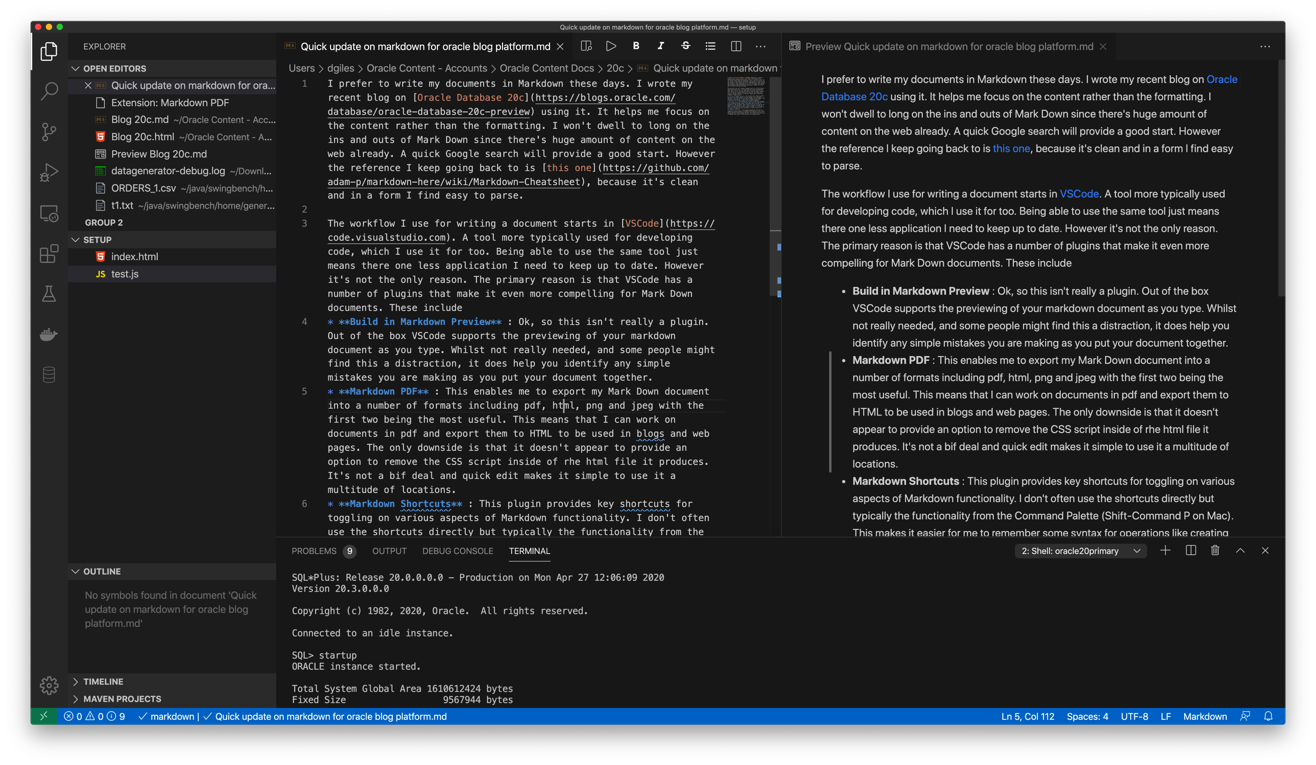
The workflow I use for writing a document starts in VSCode. A tool more typically used for developing code, which I use it for too. Being able to use the same tool just means there one less application I need to keep up to date. However it's not the only reason. The primary reason is that VSCode has a number of plugins that make it even more compelling for Mark Down documents. These include
- Build in Markdown Preview : Ok, so this isn't really a plugin. Out of the box VSCode supports the previewing of your markdown document as you type. Whilst not really needed, and some people might find this a distraction, it does help you identify any simple mistakes you are making as you put your document together.
- Markdown PDF : This enables me to export my Mark Down document into a number of formats including pdf, html, png and jpeg with the first two being the most useful. This means that I can work on documents in pdf and export them to HTML to be used in blogs and web pages. The only downside is that it doesn't appear to provide an option to remove the CSS script inside of rhe html file it produces. It's not a bif deal and quick edit makes it simple to use it a multitude of locations.
- Markdown Shortcuts : This plugin provides key shortcuts for toggling on various aspects of Markdown functionality. I don't often use the shortcuts directly but typically the functionality from the Command Palette (Shift-Command P on Mac). This makes it easier for me to remember some syntax for operations like creating tables.
Updates to Swingbench and Datagenerator
Jupyter, Python, Oracle and Docker Part 3
Create Oracle Database in a Docker Container
These Python (3.6) scripts walk through the creation of a database and standby server. The reason I've done this rather than just take the default configuration is that this approach gives me a lot more control over the build and enables me to change specifc steps. If you are just wanting to get the Oracle Database running inside of Docker I strongly suggest that you use the docker files and guides in the Oracle Github repository. The approach documented below is very much for someone who is interested in a high level of control over the various steps in the installation and configuration of the Oracle Database. This current version is build on top of Oracle's Internal GiaaS docker image but will be extended to support the public dockers images as well. It aims to build an Active Data Guard model with maximum performance but can be trivially changed to support any of the required models.
It uses a mix of calls to the Docker Python API and Calls direct to the databases via cx_Oracle.
The following code section imports the needed modules to setup up our Docker container to create the Oracle Database. After that we get a Docker client handle which enables use to call the API against our local Docker environment.
import docker
import humanize
import os
import tarfile
from prettytable import PrettyTable
import cx_Oracle
from IPython.display import HTML, display
import keyring
from ipynb.fs.full.OracleDockerDatabaseFunctions import list_images,list_containers,copy_to,create_and_run_script,containter_exec,containter_root_exec,copy_string_to_file

client = docker.from_env(timeout=600)
list_images(client)
Configuration Parameters
The following section contains the parameters for setting the configuration of the install. The following parameters image_name,host_oradata,sb_host_oradata need to be changed, although sb_host_oradata is only important if you are planning on installing a standby database.
# The following parameters are specific to your install and almost certainly need to be changed
image_name = 'cc75a47617' # Taken from the id value above
host_oradata = '/Users/dgiles/Downloads/dockerdbs/oradataprimary' # The directory on the host where primary database will be persisted
sb_host_oradata = '/Users/dgiles/Downloads/dockerdbs/oradatastby' # The direcotry on the host where the standby database will be persisted
#
# The rest are fairly generic and can be changed if needed
oracle_version = '18.0.0'
db_name = 'ORCL'
stby_name = 'ORCL_STBY'
sys_password =  keyring.get_password('docker','sys') # I'm just using keyring to hide my password but you can set it to a simple sting i.e. 'mypassword'
pdb_name = 'soe'
p_host_name = 'oracleprimary'
sb_host_name = 'oraclestby'
total_memory = 2048

container_oradata = '/u01/app/oracle/oradata'
o_base = '/u01/app/oracle'
r_area = f'{o_base}/oradata/recovery_area'
o_area = f'{o_base}/oradata/'
a_area = f'{o_base}/admin/ORCL/adump'
o_home = f'{o_base}/product/{oracle_version}/dbhome_1'
t_admin = f'{o_base}/oradata/dbconfig'
log_size = 200
Create Primary Database
This code does the heavy lifting. It creates a container oracleprimary (unless you changed the paramter) running the Oracle Database. The containers 1521 port is mapped onto the the hosts 1521 port. This means that to connect from the host, via a tool like sqlplus, all you'd need to do is sqlplus soe/soe@//locahost/soe.
path = f'{o_home}/bin:/usr/local/sbin:/usr/local/bin:/usr/sbin:/usr/bin:/sbin:/bin'

p_container = client.containers.create(image_name,
                                       command="/bin/bash",
                                       hostname=p_host_name,
                                       tty=True,
                                       stdin_open=True,
                                       auto_remove=False,
                                       name=p_host_name,
                                       shm_size='3G',
                                       # network_mode='host',
                                       ports={1521:1521,5500:5500},
                                       volumes={host_oradata: {'bind': container_oradata, 'mode': 'rw'}},
                                       environment={'PATH':path,'ORACLE_SID': db_name, 'ORACLE_BASE': o_base,'TNS_ADMIN': t_admin}
                                       )

p_container.start()
# Make all of the containers attributes available via Python Docker API
p_container.reload()
The next step uses DBCA and configures features like Automatic Memory Mangement, Oracle Managed Files and sets the size of the SGA and redo logs. It prints out the status of the creation during it's progression. NOTE : This step typically takes 10 to 12 minutes.
statement = f'''dbca -silent \
 -createDatabase \
 -templateName General_Purpose.dbc \
 -gdbname {db_name} -sid {db_name} -responseFile NO_VALUE \
 -characterSet AL32UTF8 \
 -sysPassword {sys_password} \
 -systemPassword {sys_password} \
 -createAsContainerDatabase true \
 -numberOfPDBs 1 \
 -pdbName {pdb_name} \
 -pdbAdminPassword {sys_password} \
 -databaseType MULTIPURPOSE \
 -totalMemory {total_memory} \
 -memoryMgmtType AUTO_SGA \
 -recoveryAreaDestination "{r_area}" \
 -storageType FS \
 -useOMF true \
 -datafileDestination "{o_area}" \
 -redoLogFileSize {log_size} \
 -emConfiguration NONE \
 -ignorePreReqs\
 '''

containter_exec(p_container, statement)
Create Primary Database's Listener
This step creates the database listener for the primary database. The tnsnames.ora will be over written in a later step if you choose to have a stand by configuration. NOTE : I could create a DNSMasq container or something similar and add container networking details to make the whole inter node communication simpler but it's a bit of an overkill and so we'll use IP addresses which are easily found.
p_ip_adress = p_container.attrs['NetworkSettings']['IPAddress']
p_listener = f'''LISTENER=
(DESCRIPTION=
(ADDRESS = (PROTOCOL=tcp)(HOST={p_ip_adress})(PORT=1521))
(ADDRESS = (PROTOCOL = IPC)(KEY = EXTPROC1521))
)
SID_LIST_LISTENER=
(SID_LIST=
(SID_DESC=
(GLOBAL_DBNAME={db_name}_DGMGRL)
(ORACLE_HOME={o_home})
(SID_NAME={db_name})
(ENVS="TNS_ADMIN={t_admin}" )
)
'''
copy_string_to_file(p_listener, f'{t_admin}/listener.ora', p_container)
contents = '''NAMES.DIRECTORY_PATH= (TNSNAMES, EZCONNECT)'''
copy_string_to_file(contents, f'{t_admin}/sqlnet.ora', p_container)
contents = f'''
ORCL =
(DESCRIPTION =
(ADDRESS = (PROTOCOL = TCP)(HOST = {p_ip_adress})(PORT=1521))
(CONNECT_DATA =
(SERVER = DEDICATED)
(SID = {db_name})
)
)
'''
copy_string_to_file(contents, f'{t_admin}/tnsnames.ora', p_container)
)
)
'''
copy_string_to_file(p_listener, f'{t_admin}/listener.ora', p_container)
contents = '''NAMES.DIRECTORY_PATH= (TNSNAMES, EZCONNECT)'''
copy_string_to_file(contents, f'{t_admin}/sqlnet.ora', p_container)
contents = f'''
ORCL =
(DESCRIPTION =
(ADDRESS = (PROTOCOL = TCP)(HOST = {p_ip_adress})(PORT=1521))
(CONNECT_DATA =
(SERVER = DEDICATED)
(SID = {db_name})
)
)
'''
copy_string_to_file(contents, f'{t_admin}/tnsnames.ora', p_container)
And start the listener
containter_exec(p_container, 'lsnrctl start')
At this stage you should have a fully functioning Oracle Database. In theory there's no need to go any further if thats all you want.
Create Stand By Container
This step creates another container to run the standby databases. It should be pretty much instant. NOTE : You'll only need to run the rest of the code from here if you need a standby database.
sb_container = client.containers.create(image_name,
                                       hostname=sb_host_name,
                                       command="/bin/bash",
                                       tty=True,
                                       stdin_open=True,
                                       auto_remove=False,
                                       name=sb_host_name,
                                       shm_size='3G',
                                       ports={1521:1522,5500:5501},
                                       volumes={sb_host_oradata: {'bind': container_oradata, 'mode': 'rw'}},
                                       environment={'PATH':path,'ORACLE_SID':db_name,'ORACLE_BASE':o_base,'TNS_ADMIN':t_admin}
                                       )
sb_container.start()
# Make all of the containers attributes available via Python Docker API
sb_container.reload()
Display the running containers.
list_containers(client)
Configure the Standby Database
Create some additional directories on the standby so they are consistent with the primary.
containter_exec(sb_container, f'mkdir -p {o_area}/{db_name}')
containter_exec(sb_container, f'mkdir -p {t_admin}')
containter_exec(sb_container, f'mkdir -p {r_area}/{db_name}')
containter_exec(sb_container, f'mkdir -p {a_area}')
Create Standby Database's Listener
Create the standby listenrs network configuration and then start the listener. NOTE : We'll be overwriting the primary databases tnsnames.ora file in this step.
sb_ip_adress = sb_container.attrs['NetworkSettings']['IPAddress']

contents = f'''
ORCL =
  (DESCRIPTION =
    (ADDRESS = (PROTOCOL = TCP)(HOST = {p_ip_adress})(PORT=1521))
    (CONNECT_DATA =
      (SERVER = DEDICATED)
      (SID = {db_name})
    )
  )

ORCL_STBY =
  (DESCRIPTION =
    (ADDRESS = (PROTOCOL = TCP)(HOST = {sb_ip_adress})(PORT=1521))
    (CONNECT_DATA =
      (SERVER = DEDICATED)
      (SID = {db_name})
    )
  )
'''

copy_string_to_file(contents, f'{t_admin}/tnsnames.ora', p_container)
copy_string_to_file(contents, f'{t_admin}/tnsnames.ora', sb_container)

sb_listener = f'''LISTENER=
    (DESCRIPTION=
        (ADDRESS = (PROTOCOL=tcp)(HOST={sb_ip_adress})(PORT =1521))
        (ADDRESS = (PROTOCOL = IPC)(KEY = EXTPROC1521))
    )

SID_LIST_LISTENER=
    (SID_LIST=
        (SID_DESC=
            (GLOBAL_DBNAME={stby_name}_DGMGRL)
            (ORACLE_HOME={o_home})
            (SID_NAME={db_name})
            (ENVS="TNS_ADMIN={t_admin}"
        )
    )
'''
copy_string_to_file(sb_listener, f'{t_admin}/listener.ora', sb_container)

contents = '''NAMES.DIRECTORY_PATH= (TNSNAMES, EZCONNECT)'''

copy_string_to_file(contents, f'{t_admin}/sqlnet.ora', sb_container)
And start the listener
containter_exec(sb_container, 'lsnrctl start')
Configure the servers for Data Guard
It might be necessary to pause for a few seconds before moving onto the next step to allow the database to register with the listener...
The next step is to connect to primary and standby servers and set various parameters and configuration to enable us to run Data Guard.
First check the status of archive logging on the primary.
connection = cx_Oracle.connect("sys",sys_password,f"//localhost:1521/{db_name}", mode=cx_Oracle.SYSDBA)
cursor = connection.cursor();
rs = cursor.execute("SELECT log_mode FROM v$database")
for row in rs:
    print(f"Database is in {row[0]} mode")
By default it will be in no archivelog mode so we need to shut it down and enable archive log mode
contents = '''sqlplus / as sysdba << EOF
SET ECHO ON;
SHUTDOWN IMMEDIATE;
STARTUP MOUNT;
ALTER DATABASE ARCHIVELOG;
ALTER DATABASE OPEN;
EOF
'''

create_and_run_script(contents, '/tmp/set_archivelog.sql',  '/bin/bash /tmp/set_archivelog.sql', p_container)
And check again
connection = cx_Oracle.connect("sys",sys_password,f"//localhost:1521/{db_name}", mode=cx_Oracle.SYSDBA)
cursor = connection.cursor();
rs = cursor.execute("SELECT log_mode FROM v$database")
for row in rs:
    print(f"Database is in {row[0]} mode")
And then force a log switch
cursor.execute("ALTER DATABASE FORCE LOGGING")
cursor.execute("ALTER SYSTEM SWITCH LOGFILE")
Add some Standby Logging Files
cursor.execute("ALTER DATABASE ADD STANDBY LOGFILE SIZE 200M")
cursor.execute("ALTER DATABASE ADD STANDBY LOGFILE SIZE 200M")
cursor.execute("ALTER DATABASE ADD STANDBY LOGFILE SIZE 200M")
cursor.execute("ALTER DATABASE ADD STANDBY LOGFILE SIZE 200M")
Enable Flashback and standby file management
cursor.execute("ALTER DATABASE FLASHBACK ON")
cursor.execute("ALTER SYSTEM SET STANDBY_FILE_MANAGEMENT=AUTO")
Start an instance
Create a temporary init.ora file to enable us to start an instance on the standby
contents = f"DB_NAME='{db_name}'\n"
copy_string_to_file(contents, f'/tmp/init{db_name}.ora', sb_container)
Create a password file on the standby with the same parameters as the primary
containter_exec(sb_container, f'orapwd file=$ORACLE_HOME/dbs/orapw{db_name} password={sys_password} entries=10 format=12')
And start up the standby instance
contents = f'''STARTUP NOMOUNT PFILE='/tmp/init{db_name}.ora';
EXIT;
'''
create_and_run_script(contents, '/tmp/start_db.sql', 'sqlplus / as sysdba @/tmp/start_db.sql', sb_container)
Duplicate the Primary database to the Standby database
Duplicate the primary to the standby. For some reason the tnsnames isn't picked up on the primary/standby in the same location so an explicit connection string is needed.
contents = f'''rman TARGET sys/{sys_password}@{db_name} AUXILIARY sys/{sys_password}@{stby_name} << EOF
DUPLICATE TARGET DATABASE
  FOR STANDBY
  FROM ACTIVE DATABASE
  DORECOVER
  SPFILE
    SET db_unique_name='{stby_name}' COMMENT 'Is standby'
  NOFILENAMECHECK;
EOF
'''

create_and_run_script(contents, '/tmp/duplicate.sh', "/bin/bash /tmp/duplicate.sh", sb_container)
Start the Data Guard Broker
It's best practice to use Data Guard Broker and so we'll need to start it on both instances and then create a configuration.
cursor.execute("ALTER SYSTEM SET dg_broker_start=true")

sb_connection = cx_Oracle.connect("sys",sys_password,f"//localhost:1522/{stby_name}", mode=cx_Oracle.SYSDBA)
sb_cursor = sb_connection.cursor()
sb_cursor.execute("ALTER SYSTEM SET dg_broker_start=true")
Create a configuration
contents = f'''export TNS_ADMIN={t_admin};
dgmgrl sys/{sys_password}@{db_name} << EOF
SET ECHO ON;
CREATE CONFIGURATION orcl_stby_config AS PRIMARY DATABASE IS {db_name} CONNECT IDENTIFIER IS {db_name};
EXIT;
EOF
'''

create_and_run_script(contents, '/tmp/dgconfig.sh', "/bin/bash /tmp/dgconfig.sh", p_container)
Add the standby
contents = f'''export TNS_ADMIN={t_admin};
dgmgrl sys/{sys_password}@{db_name} << EOF
SET ECHO ON;
ADD DATABASE {stby_name} AS CONNECT IDENTIFIER IS {stby_name} MAINTAINED AS PHYSICAL;
EXIT;
EOF
'''

create_and_run_script(contents, '/tmp/dgconfig2.sh', "/bin/bash /tmp/dgconfig2.sh", p_container)
Enable the configuration
contents = f'''export TNS_ADMIN={t_admin};
dgmgrl sys/{sys_password}@{db_name} << EOF
SET ECHO ON;
ENABLE CONFIGURATION;
EXIT;
EOF
'''

create_and_run_script(contents, '/tmp/dgconfig3.sh', "/bin/bash /tmp/dgconfig3.sh", p_container)
Display the configuration
contents = f'''export TNS_ADMIN={t_admin};
dgmgrl sys/{sys_password}@{db_name} << EOF
SET ECHO ON;
SHOW CONFIGURATION;
SHOW DATABASE {db_name};
SHOW DATABASE {stby_name};
EOF
'''

create_and_run_script(contents, '/tmp/dgconfig4.sh', "/bin/bash /tmp/dgconfig4.sh", p_container)
/bin/bash /tmp/dgconfig4.sh
DGMGRL for Linux: Release 18.0.0.0.0 - Production on Mon Mar 25 17:14:40 2019
Version 18.3.0.0.0

Copyright (c) 1982, 2018, Oracle and/or its affiliates.  All rights reserved.

Welcome to DGMGRL, type "help" for information.
Connected to "ORCL"
Connected as SYSDBA.
DGMGRL>
DGMGRL>
SHOW CONFIGURATION;

Configuration - orcl_stby_config
Protection Mode: MaxPerformance
Members:
orcl      - Primary database
  orcl_stby - Physical standby database
Warning: ORA-16854: apply lag could not be determined

Fast-Start Failover: DISABLED
Configuration Status:
WARNING (status updated 7 seconds ago)
DGMGRL>
SHOW DATABASE ORCL;
Database - orcl
Role:             PRIMARY
Intended State:   TRANSPORT-ON
Instance(s):
  ORCL
Database Status:
SUCCESS
DGMGRL>
SHOW DATABASE ORCL_STBY;
Database - orcl_stby
Role:             PHYSICAL STANDBY
Intended State:   APPLY-ON
Transport Lag:    0 seconds (computed 2 seconds ago)
Apply Lag:        (unknown)
Average Apply Rateunknown)
Real Time Query:  OFF
Instance(s):
  ORCL


Database Warning(s):
ORA-16854: apply lag could not be determined

Database Status:
WARNING

DGMGRL>
DGMGRL>
Start the Standby in managed recovery
We now need to start the standby so it begins applying redo to keep it consistent with the primary.
contents='''sqlplus / as sysdba << EOF
SET ECHO ON;
SHUTDOWN IMMEDIATE;
STARTUP MOUNT;
ALTER DATABASE RECOVER MANAGED STANDBY DATABASE DISCONNECT FROM SESSION;
EOF
'''

create_and_run_script(contents, '/tmp/convert_to_active.sh', "/bin/bash /tmp/convert_to_active.sh", sb_container)
Standby Database Creation Complete
We now have a primary and standby database that we can begin testing with.
Additional Steps
At this point you should have a physical standby database that is running in maximum performance mode. This might be enough for the testing you want to carry out but there's a number of possible changes that you might want to consider.
- Change the physical standby database to an Active Standby
- Convert the current mode (Maximum Performance) to Maximum Protection or Maximum Availability
- Configure the Oracle Database 19c Active Data Guard feature, DML Redirect
I'll cover these in the following sections but they "icing on the cake" rather than required.
Active Data Guard
This is a relatively trivial change. We just need to alter the standby database to open readonly and then start managed recovery as before
contents='''sqlplus / as sysdba << EOF
SET ECHO ON;
SHUTDOWN IMMEDIATE;
STARTUP MOUNT;
ALTER DATABASE OPEN READ ONLY;
ALTER DATABASE RECOVER MANAGED STANDBY DATABASE DISCONNECT FROM SESSION;
EOF
'''

create_and_run_script(contents, '/tmp/convert_to_active.sh', "/bin/bash /tmp/convert_to_active.sh", sb_container)
Maximum Performance to Maximum Availability
For this change we'll use the Database Guard Broker command line tool to make the change
contents = f'''
dgmgrl sys/{sys_password}@{db_name} << EOF
SET ECHO ON;
SHOW CONFIGURATION;
edit database {stby_name} set property logxptmode=SYNC;
edit configuration set protection mode as maxavailability;
SHOW CONFIGURATION;
EOF
'''

create_and_run_script(contents, '/tmp/max_avail.sh', "/bin/bash /tmp/max_avail.sh", p_container)
Maximum Performance to Maximum Protection
As before we'll use the Database Guard Broker command line tool to make the change.
contents = f'''
dgmgrl sys/{sys_password}@{db_name} << EOF
SET ECHO ON;
SHOW CONFIGURATION;
edit database {stby_name} set property logxptmode=SYNC;
edit configuration set protection mode as maxprotection;
SHOW CONFIGURATION;
EOF
'''

create_and_run_script(contents, '/tmp/max_prot.sh', "/bin/bash /tmp/max_prot.sh", p_container)
Back to Max Perfromance
We'll use Database Guard Broker to change us back to asynchronus mode.
contents = f'''
dgmgrl sys/{sys_password}@{db_name} << EOF
SET ECHO ON;
SHOW CONFIGURATION;
edit configuration set protection mode as maxperformance;
edit database {stby_name} set property logxptmode=ASYNC;
SHOW CONFIGURATION;
EOF
'''

create_and_run_script(contents, '/tmp/max_prot.sh', "/bin/bash /tmp/max_prot.sh", p_container)
Oracle Database 19c Acvtive Data Guard DML Redirect
On Oracle Database 19c we can also enable DML redirect from the standby to the primary. I'll add this on the release of the Oracle Database 19c software for on premises.
Jupyter, Python, Oracle and Docker Part 2
Build Docker Oracle Database Base Image
The following notebook goes through the process of building an Oracle Docker image of the Oracle Database. If you are just wanting to get the Oracle Database running inside of Docker I strongly suggest that you use the docker files and guides in the Oracle Github repository. The approach documented below is very much for someone who is interested in a high level of control over the various steps in the installation and configuration of the Oracle Database or simply to understand how the various teps work.
Prerequisites
The process documented below uses a Jupyter Notebook (iPython). The reason I use this approach and not straight python is that it's easy to change and is self documenting. It only takes a few minutes to set up the environment. I've included a requirements file which makes it very simple to install the needed Python libraries. I go through the process of setting up a Jupyter environment for Mac and Linux here.
Running the notebook
Typically the only modification that the user will need to do is to modifythe values in the "Parameters" section. The code can then be run by pressing "Command SHIFT" on a Mac or "Ctrl Shift" on Windows. Or by pressing the "Play" icon in the tool bar. It is also possible to run all of the cells automatically, you can do this from "Run" menu item.
import docker
import os
import tarfile
from prettytable import PrettyTable
from IPython.display import HTML, display, Markdown
import humanize
import re
from ipynb.fs.full.OracleDockerDatabaseFunctions import list_images,list_containers,copy_to,create_and_run_script,containter_exec,copy_string_to_file,containter_root_exec

client = docker.from_env(timeout=600)
Parameters
This section details the parameters used to define the docker image you'll end up creating. It's almost certainly the case that you'll need to change the parameters in the first section. The parameters in the second section can be changed if there's something i.e. hostname that you want to change
# You'll need to to change the following two parameters to reflect your environment
host_orabase = '/Users/dgiles/oradata18c' # The directory on the host where you'll stage the persisted datafiles
host_install_dir = '/Users/dgiles/Downloads/oracle18_software' # The directory on the host where the downloaded Oracle Database zip file is.
# You can change any of the following parameters but it's not necssary
p_host_name = 'oracle_db'
oracle_version = '18.0.0'
oracle_base = '/u01/app/oracle'
oracle_home = f'{oracle_base}/product/{oracle_version}/dbhome_1'
db_name = 'ORCL'
oracle_sid= db_name
path=f'{oracle_home}/bin:$PATH'
tns_admin=f'{oracle_base}/oradata/dbconfig'
container_oradata = '/u01/app/oracle/oradata'
r_area = f'{oracle_base}/oradata/recovery_area'
a_area = f'{oracle_base}/admin/ORCL/adump'
container_install_dir = '/u01/install_files'
path = f'{oracle_home}/bin:/usr/local/sbin:/usr/local/bin:/usr/sbin:/usr/bin:/sbin:/bin'
Attempt to create the needed directories on the host and print warnings if needed
try:
    os.makedirs(host_orabase, exist_ok=True)
    os.makedirs(host_install_dir, exist_ok=True)
except:
   display(Markdown(f'**WARNING** : Unable to create directories {host_orabase} and {host_install_dir}'))

files = os.listdir(host_install_dir)
found_similar:bool = False
for file in files:
    if file.startswith('LINUX.X64'):
        found_similar = True
        break
if not found_similar:
    display(Markdown(f"**WARNING** : Are you sure that you've downloaded the needed Oracle executable to the `{host_install_dir}` directory"))
The first step in creating a usable image is to create a docker file. This details what the docker container will be based on and what needs to be installed. It will use the parameters defined above. It does require network connectivity for this to work as docker will pull down the required images and RPMs.
script = f'''
FROM oraclelinux:7-slim

ENV ORACLE_BASE={oracle_base} \
    ORACLE_HOME={oracle_home} \
    ORACLE_SID={oracle_sid} \
    PATH={oracle_home}/bin:$PATH

RUN yum -y install unzip
RUN yum -y install oracle-database-preinstall-18c
RUN yum -y install openssl

# RUN groupadd -g 500 dba
# RUN useradd -ms /bin/bash -g dba oracle

RUN mkdir -p $ORACLE_BASE
RUN mkdir -p $ORACLE_HOME
RUN mkdir -p {container_install_dir}

RUN chown -R oracle:dba {oracle_base}
RUN chown -R oracle:dba {oracle_home}
RUN chown -R oracle:dba {container_install_dir}

USER oracle
WORKDIR /home/oracle

VOLUME ["$ORACLE_BASE/oradata"]
VOLUME ["{container_install_dir}"]
EXPOSE 1521 8080 5500
'''

with open('Dockerfile','w') as f:
    f.write(script)
And now we can create the image. The period of time for this operation to complete will depend on what docker images have already been downloaded/cached and your network speed.
image, output = client.images.build(path=os.getcwd(),dockerfile='Dockerfile', tag=f"linux_for_db{oracle_version}",rm="True",nocache="False")
for out in output:
    print(out)
Once the image has been created we can start a container based on it.
db_container = client.containers.create(image.short_id,
                                       command="/bin/bash",
                                       hostname=p_host_name,
                                       tty=True,
                                       stdin_open=True,
                                       auto_remove=False,
                                       name=p_host_name,
                                       shm_size='3G',
                                       # network_mode='host',
                                       ports={1521:1522,5500:5501},
                                       volumes={host_orabase: {'bind': container_oradata, 'mode': 'rw'}, host_install_dir: {'bind': container_install_dir, 'mode': 'rw'}},
                                       environment={'PATH':path,'ORACLE_SID': db_name, 'ORACLE_BASE': oracle_base,'TNS_ADMIN': tns_admin, 'ORACLE_HOME':oracle_home}
                                       )

#                                        volumes={host_orabase: {'bind': oracle_base, 'mode': 'rw'}, host_install_dir: {'bind': container_install_dir, 'mode': 'rw'}},

db_container.start()
p_ip_adress = db_container.attrs['NetworkSettings']['IPAddress']
And then created the needed directory structure within it.
containter_exec(db_container, f'mkdir -p {container_oradata}/{db_name}')
containter_exec(db_container, f'mkdir -p {tns_admin}')
containter_exec(db_container, f'mkdir -p {r_area}/{db_name}')
containter_exec(db_container, f'mkdir -p {a_area}')
containter_exec(db_container, f'mkdir -p {oracle_base}/oraInventory')
containter_exec(db_container, f'mkdir -p {oracle_home}')
containter_root_exec(db_container,'usermod -a -G dba oracle')
Unzip Oracle Database software and validate
We now need to unzip the Oracle software which should be located in the host_install_dir variable. This is unzipped within the container not the host. NOTE: I don't stream the output because it's realtively large. It should take 2-5 minutes.
files = [f for f in os.listdir(host_install_dir) if f.endswith('.zip')]

if files == 0:
    display(Markdown(f"**There doesn't appear to be any zip files in the {host_install_dir} directory. This should contain the oracle database for Linux 64bit in its orginal zipped format**"))
else:
    display(Markdown(f'Unzipping `{files[0]}`'))
    containter_exec(db_container, f'unzip -o {container_install_dir}/{files[0]} -d {oracle_home}', show_output=False, stream_val=False)
And now display the contents of the Oracle Home
display(Markdown('Directory Contents'))
containter_exec(db_container, f'ls -l {oracle_home}')
The next step is to create an Oracle Installer response file to reflect the paremeters we've defined. We're only going to perform a software only install.
script = f'''oracle.install.responseFileVersion=/oracle/install/rspfmt_dbinstall_response_schema_v18.0.0
oracle.install.option=INSTALL_DB_SWONLY
UNIX_GROUP_NAME=dba
INVENTORY_LOCATION={oracle_base}/oraInventory
ORACLE_BASE={oracle_base}
ORACLE_HOME={oracle_home}
oracle.install.db.InstallEdition=EE
oracle.install.db.OSDBA_GROUP=dba
oracle.install.db.OSBACKUPDBA_GROUP=dba
oracle.install.db.OSDGDBA_GROUP=dba
oracle.install.db.OSKMDBA_GROUP=dba
oracle.install.db.OSRACDBA_GROUP=dba
'''

copy_string_to_file(script, f'{oracle_home}/db_install.rsp', db_container)
Run the Oracle Installer
Now we can run the Oracle Installer in silent mode with a response file we've just created.
containter_exec(db_container, f'{oracle_home}/runInstaller -silent -force -waitforcompletion -responsefile {oracle_home}/db_install.rsp -ignorePrereqFailure')
containter_root_exec(db_container,f'/bin/bash {oracle_base}/oraInventory/orainstRoot.sh')
containter_root_exec(db_container,f'/bin/bash {oracle_home}/root.sh')
Commit the container to create an image
And finally we can commit the container creating an image for future use.
repository_name = 'dominicgiles'
db_container.commit(repository=repository_name,tag=f'db{oracle_version}')
Tidy Up
The following code is included to enable you to quickly drop the container and potentially the immage.
db_container.stop()
db_container.remove()
list_containers(client)
list_images(client)
#client.images.remove(image.id)

#list_images()